
Link an International Card to Alipay and WeChat Pay
2,767 words, 15 minutes read time.

travel better
On this page
Quick Answer
You can usually link an international card to Alipay or WeChat Pay with your passport details, a working phone number, and card issuer verification. The cardholder name, passport name, and app identity information should match as closely as possible.
Do this before your first busy travel day in China. If one app fails, try the other, contact your card issuer, or keep RMB cash as backup. Limits, supported card brands, and fees can change, so follow the exact prompts inside the payment app.
Passport, phone number, card, and issuer verification access
Set up and test before arrival or on hotel Wi-Fi
Name mismatch or card issuer security block
Use the other app, cash, or a physical card
As of May 2026, linking an international bank card to Alipay or WeChat Pay is much more practical for foreign visitors than it used to be, but it still depends on app verification, card issuer approval, supported card brands, and merchant compatibility. This guide gives you the setup steps, common failure points, and backup options to prepare before your trip.
The ability to pay with your phone just like locals do – for everything from street snacks to souvenir shopping – is a game-changer for convenience. Let's get your accounts set up!
I. Before You Begin: Essential Checklist
Preparation is key. Before you attempt to link your cards, ensure you have the following ready:
- A Compatible Smartphone: An up-to-date iOS (iPhone) or Android smartphone with sufficient storage and a working camera.
- Latest App Versions: Download or update to the latest versions of Alipay and WeChat from the official Apple App Store or Google Play Store.
- Stable Internet Connection: A reliable Wi-Fi connection is best for the initial setup process, especially for downloading apps and completing verification. You'll need mobile data (roaming or a local SIM) for using the apps in China.
- Valid International Credit or Debit Card:
- Supported networks can include Visa, Mastercard, American Express, JCB, Diners Club, and Discover, but actual support may vary by app, card issuer, verification status, and merchant.
- Your Valid Passport: You will need clear photos or scans of your passport's information page for identity verification (also known as “Real-Name Authentication”).
- Your Active Mobile Phone Number: This will be used for account registration and receiving SMS verification codes. Your regular international phone number usually works.
Notify Your Bank: Crucially, inform your bank(s) about your travel plans to China and that you intend to link your card(s) to Chinese payment platforms. This helps prevent your bank from flagging these activities as suspicious and blocking your card.
II. Step-by-Step Guide: Linking Your International Card to Alipay
Follow these detailed steps to connect your card to Alipay:
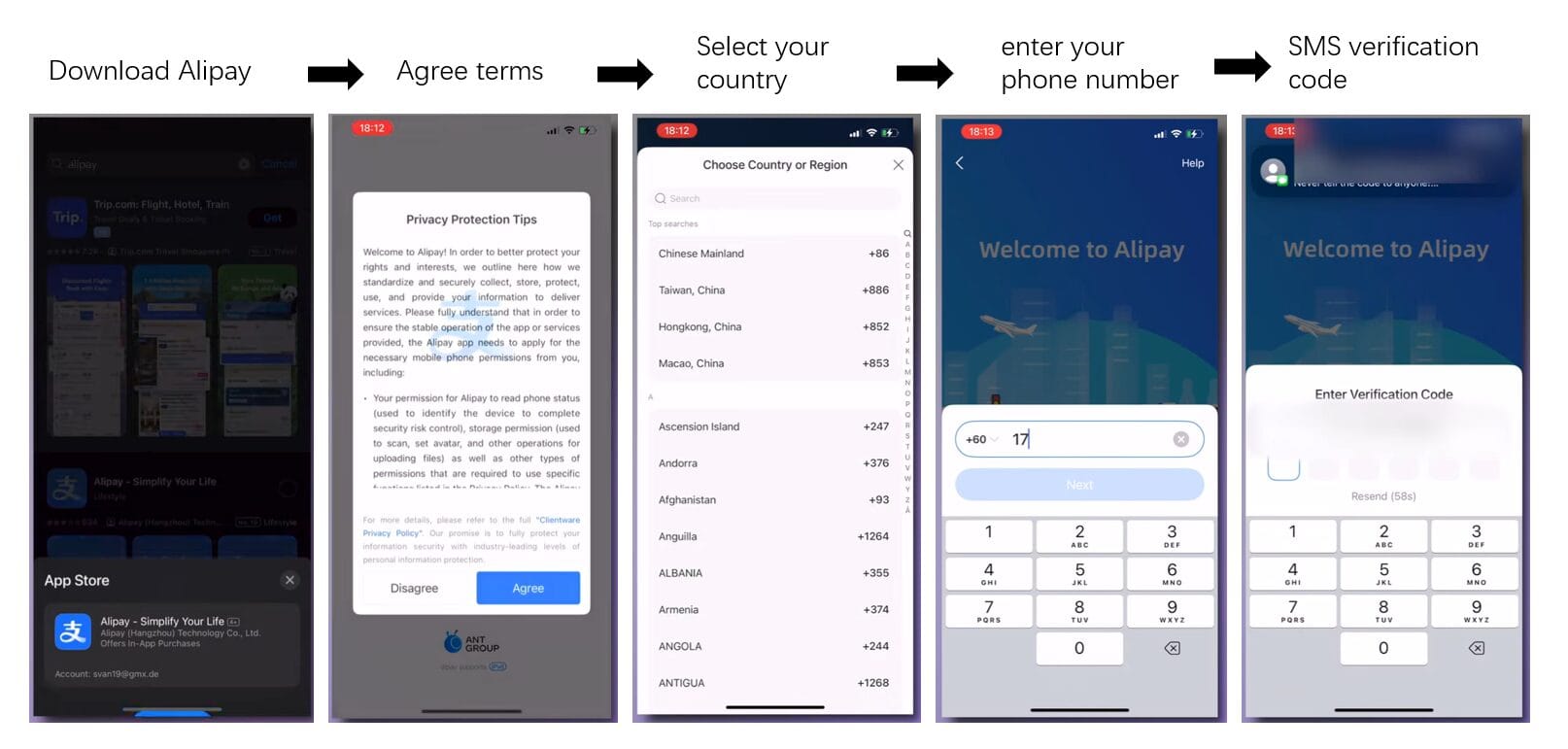
Step 1: Download and Register on Alipay
- Download “Alipay” from your phone's official app store.
- Open the app. You'll likely be prompted to register or log in.
- Register an Account:
- Select your country code and enter your mobile phone number.
- You'll receive an SMS verification code. Enter it to proceed.
- Agree to the terms and conditions.
- Set Language & Region (if needed): Alipay usually defaults to English if your phone's system language is English. If prompted, you can select your region as “International” or your specific country.
Step 2: Complete Identity Verification (Real-Name Authentication – 实名认证 Shímíng Rènzhèng)
This is a mandatory security step required by Chinese regulations and is essential for linking international cards and unlocking most payment functionalities.
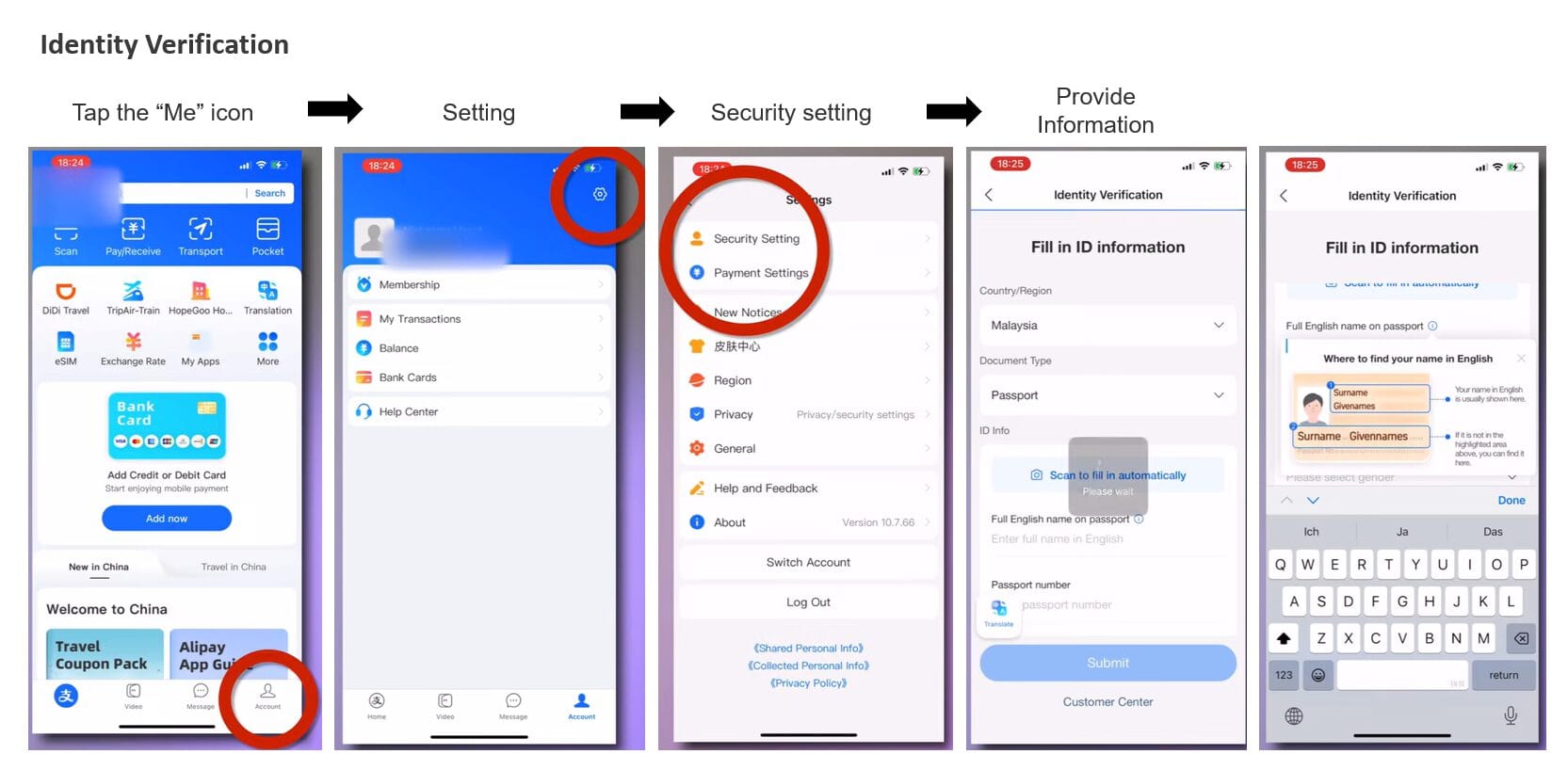
- Navigate to Verification:
- Tap the “Me” icon (usually in the bottom right corner).
- Tap on your profile section at the top (where your name/number is displayed) or look for an “Identity Verification,” “Real-name Authentication,” or “Profile Completion” prompt. Sometimes, this is prompted after you attempt to add a bank card.
- Provide Information:
- You will typically be asked to fill in:
- Nationality
- Full Name (Exactly as it appears on your passport)
- Passport Number
- Passport Expiry Date
- Date of Birth
- You will typically be asked to fill in:
- Upload Passport Photo:
- You'll need to take or upload a clear photo of your passport's main information page. Ensure all details are legible, with no glare or obstructions.
- Submit and Wait:
- Once submitted, verification can take anywhere from a few minutes to several hours, or occasionally up to a day or two. You'll usually receive an in-app notification once it's complete.
Step 3: Add Your International Bank Card
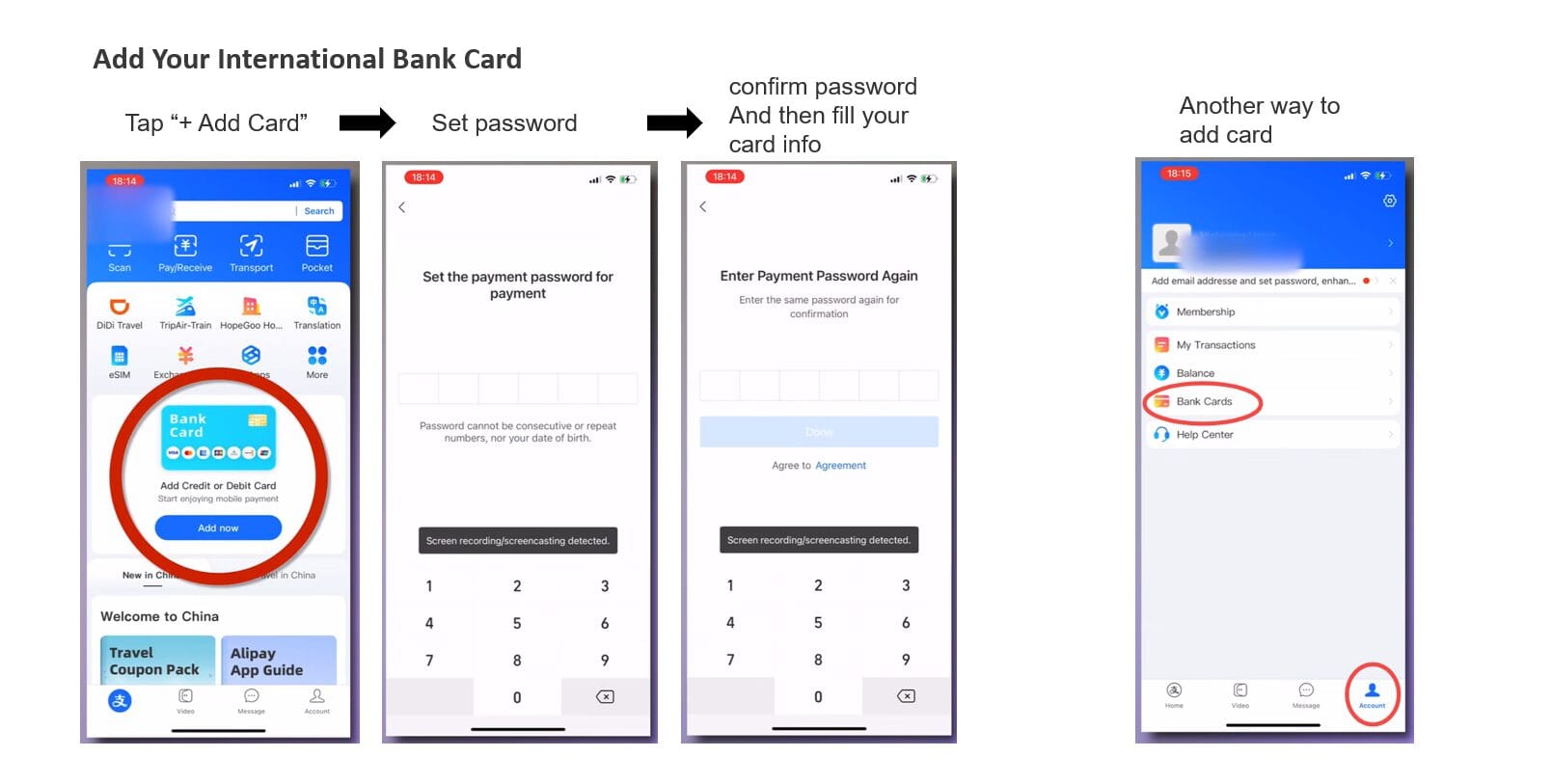
- Navigate to Bank Card Section:
- On the Alipay app, tap the “Me” icon.
- Select “Bank Cards”.
- Tap “+ Add Card” or a similar button.
- Enter Card Details:
- Input your international card number. Alipay should automatically detect the card type (Visa, Mastercard, etc.).
- Enter the Cardholder Name (this must exactly match the name printed on your card).
- Enter the card's Expiry Date and CVV/CVC code (the 3 or 4-digit security code, usually on the back).
- Enter Billing Address:
- You may be asked for the billing address associated with your card. Enter it as accurately as possible, matching your bank's records.
- Bank Verification (if required):
- Your bank might send an SMS with a one-time password (OTP) to your registered phone number to authorize the linking.
- Some banks perform a micro-transaction (a very small temporary charge) to verify the card.
- Confirmation:
- Once successful, your card will appear in the “Bank Cards” list. You're now ready to use Alipay for payments!
III. Step-by-Step Guide: Linking Your International Card to WeChat Pay
The process for WeChat Pay is very similar, integrated within the main WeChat app.
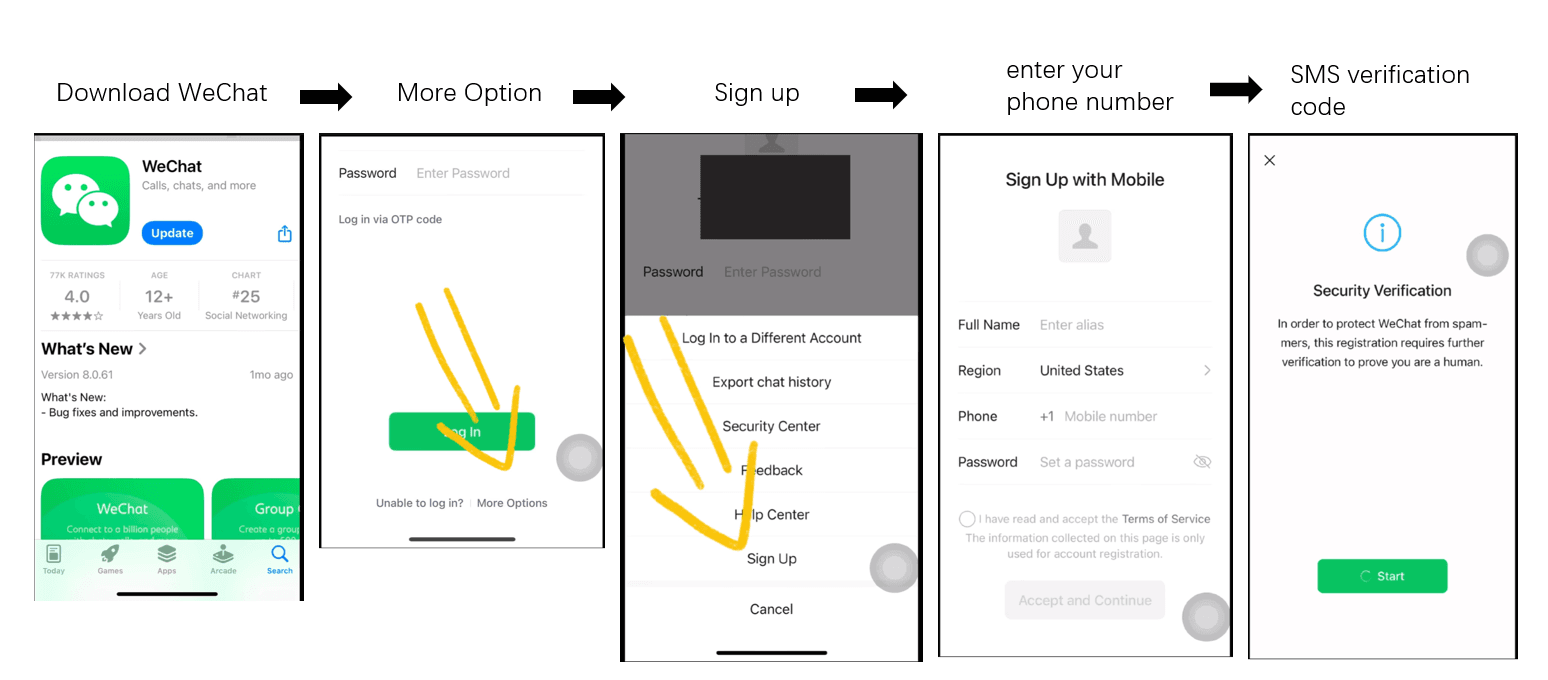
Step 1: Download WeChat and Register Account (if you haven't already)
- Download “WeChat” from your phone's official app store.
- Open the app and register an account using your mobile phone number (international numbers are generally accepted). Follow the SMS verification process.
Step 2: Access and Activate WeChat Pay (Wallet)
- Once logged into WeChat, tap the “Me” icon (bottom right).
- Go to “Services”. (If “Services” isn't visible, you might need to receive a small “red packet” or have a friend with an activated WeChat Pay send you a tiny transfer to trigger its appearance. However, for new international users, it's often available by default now).
- Within “Services,” tap “Wallet”.
- You may need to agree to the WeChat Pay User Agreement to activate the Wallet function. Set a 6-digit payment password when prompted. This is specific to WeChat Pay transactions.
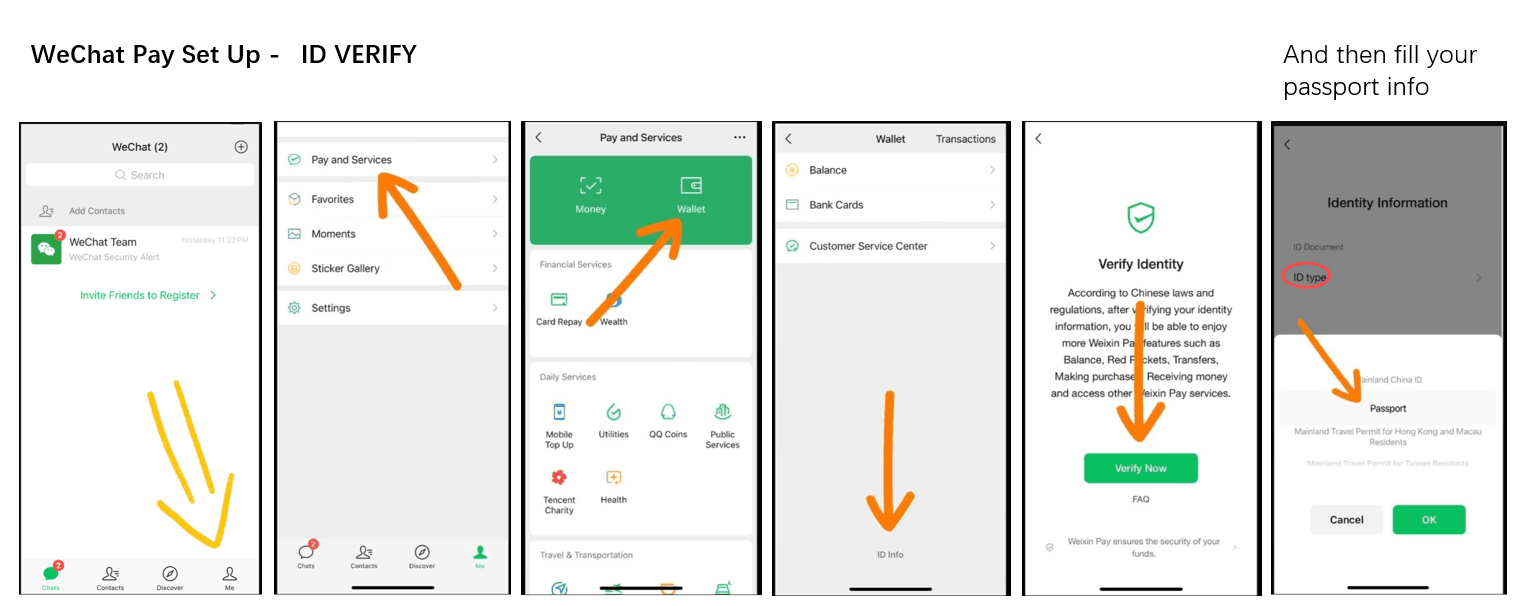
Step 3: Complete Identity Verification (Real-Name Authentication)
As with Alipay, this is crucial for linking international cards.
- Navigate to Verification:
- From the “Wallet” screen, tap the Card icon (often in the top right) or look for an option like “Identity Information,” “Real-name Authentication,” or “Manage Real-name Authentication.” This might also be prompted when you try to add a card.
- Provide Information & Upload Passport:
- The process is similar to Alipay: enter your Nationality, Full Name (as per passport), Passport Number, Passport Expiry Date, Date of Birth, and upload a clear photo of your passport's information page.
- Submit and Wait for Verification.
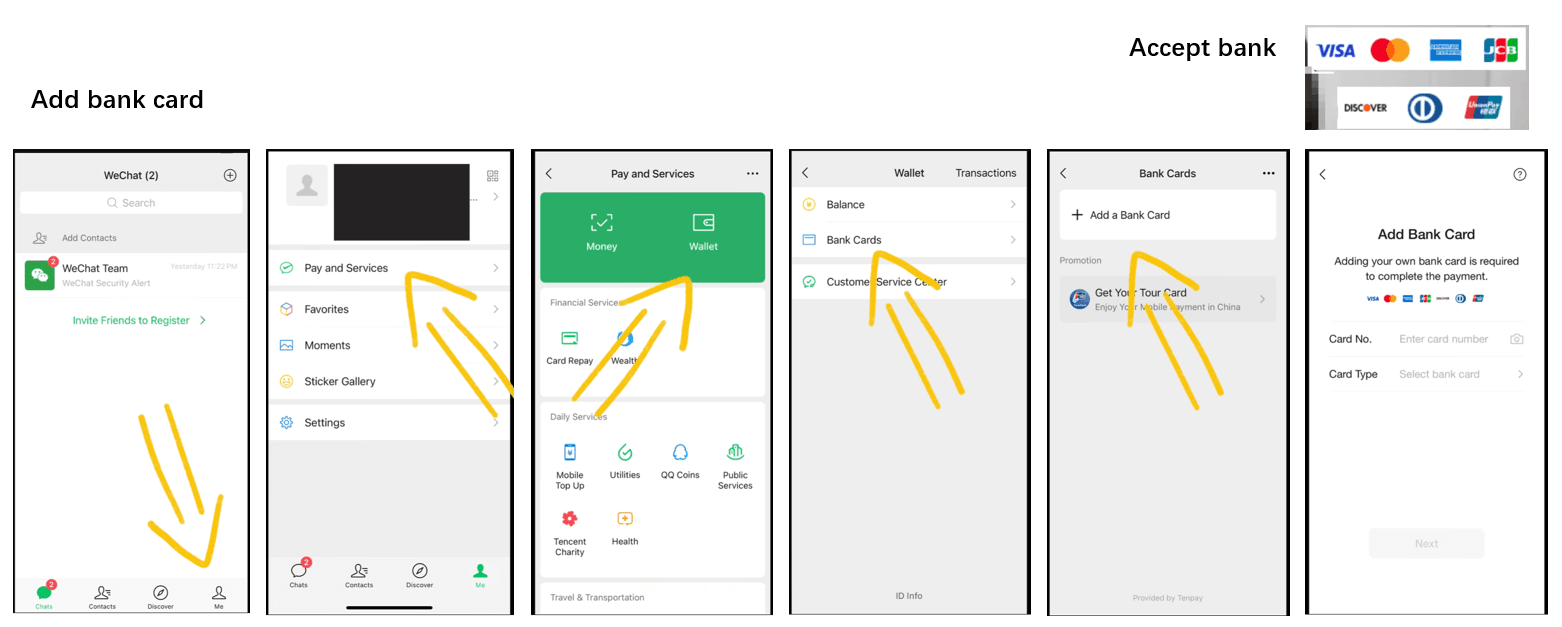
Step 4: Add Your International Bank Card
- Navigate to Bank Card Section:
- In “Wallet,” tap “Cards” or “Bank Cards.”
- Tap “+ Add a Card.”
- Enter Card Details:
- Input your international card number.
- Select the Card Type if not auto-detected.
- Enter Cardholder Name (exactly as on the card), Expiry Date, and CVV/CVC code.
- Enter Billing Address & Phone Number:
- You'll likely need to provide the billing address and the phone number associated with the card (this might be your international number used for bank notifications).
- Bank Verification:
- Expect an SMS OTP from your bank or a similar verification step.
- Confirmation:
- Your card will appear in your WeChat Pay “Cards” list once successfully linked.
IV. Transaction Limits & Fees (Current Policy Notes)
Important Update: In response to new regulations aimed at facilitating international travel, transaction limits for international cards have been significantly increased as of 2024/2025.
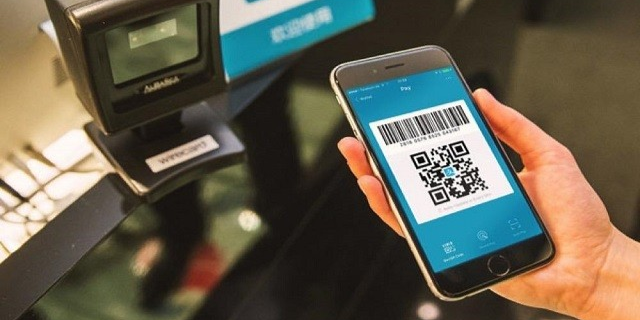
Note on “Scanning” vs. “Being Scanned”: Most international cards work best when you scan the merchant's QR code (active scan) or show your payment code to a merchant with a scanner (passive scan). Peer-to-peer transfers are generally restricted.
Updated Transaction Limits
The People's Bank of China has raised reference limits for foreign visitors using mobile payment services, but your actual usable limit can still depend on wallet verification, card issuer controls, merchant category, and current app policy:
- Single Transaction Limit: Increased from $1,000 to $5,000 USD (approx. ¥35,000 RMB).
- Annual Cumulative Limit: Increased from $10,000 to $50,000 USD (approx. ¥350,000 RMB), subject to app verification and policy conditions.
Transaction Fees
- Small payments: Some international-card payments under RMB 200 may qualify for platform fee waivers.
- Larger payments: A platform fee, often around 3%, may apply depending on the wallet, card, and current policy.
- Before paying: Check the final in-app payment prompt, because fees and exchange handling can change.
| Feature | Standard Policy (Intl. Cards) | Notes |
|---|---|---|
| Single Limit | ~$5,000 USD (¥35,000) | Significantly higher than previous years. |
| Annual Limit | ~$50,000 USD (¥350,000) | Resets every calendar year. |
| Fee Waiver | Often small payments under RMB 200 | Useful for coffee, taxis, and snacks; always check the app prompt. |
| Exchange Rate | Provided by card network, issuer, and/or wallet | Check the final amount and currency before confirming. |
V. Critical Usage Scenarios: What Works & What Doesn't
Understanding the distinction between “Merchant Payments” and “Personal Transfers” prevents many awkward situations.
✅ Supported (B2C)
International cards CAN be used for:
- Merchants: Restaurants, supermarkets, convenience stores (7-11, FamilyMart), malls.
- Transport Apps: Didi (Ride-hailing), 12306 (Trains), Trip.com.
- Online Shopping: JD.com, Taobao (selected shops), Meituan (Food Delivery).
- Scanning Merchants: Scanning a QR code printed on a formal stand or digital screen.
❌ NOT Supported (C2C)
International cards usually CANNOT be used for:
- Red Packets (Hongbao): You cannot send lucky money to friends.
- Person-to-Person Transfers: You cannot transfer money directly to a friend's balance or a landlord's personal account.
- Top-Up Balance: You cannot “load” money into your Alipay/WeChat balance wallet using a foreign card. You typically “pay as you go.”
Unlock Transport Power: The “Mini-Programs”
You don't need to download separate apps for everything. Alipay and WeChat host “Mini-Programs” inside them.
How to use DiDi (Chinese Uber) inside Alipay/WeChat:
- Open Alipay or WeChat.
- In the search bar at the top, type “DiDi” or “Ride”.
- Select the “DiDi Ride-hailing” mini-program.
- Grant location permissions. You can now book cars, and the fee will be deducted directly from your linked international card!
- Tip: DiDi has an English interface option within the mini-program.
How to ride the Metro/Bus:
Instead of buying tokens, search for “Transport” or “Metro” in Alipay.
- Tap “Transport” (often a bus/train icon).
- Select the city you are in.
- Get a QR code card. Scan this at the subway turnstile.
- Note: Not all cities support international cards for direct Metro QR scanning yet (Shanghai and Beijing often do, others vary), but it is rapidly expanding.
VI. Frequently Asked Questions (FAQ) – Linking International Cards
This section addresses common queries and issues encountered during the card-linking process.
A. Registration & Identity Verification Issues:
A: This often happens if the vendor is using a personal QR code (C2C) to receive business payments (common with small street food stalls). Since international cards don't support C2C transfers, it fails. Solution: Ask if they have a “Business Code” or offer to pay cash.
A: While not strictly required for the payment apps (international numbers work), having a local SIM is highly recommended for using Wi-Fi in public places and receiving verification codes for other apps (like food delivery or bike sharing).
A: Check that you've selected the correct country code and entered your phone number accurately. Ensure your phone has a good network signal. Wait a few minutes and try “Resend Code.” If issues persist, try restarting your phone or, if feasible, try with a different phone number (e.g., a local Chinese SIM if you acquire one later).
- Ensure the photo of your passport is extremely clear, with no glare, shadows, or cut-off edges. All text must be easily readable.
- Double-check that the typed information (name, passport number, dates) exactly matches your passport. Even a small typo can cause failure.
- Verification can sometimes take up to 24-48 hours, though it's often much faster. If it fails, the app usually allows you to re-submit.
- If repeated failures occur, you may need to contact the app's customer support (often found within the app's help section).
A: Yes, for almost all practical purposes. It's a regulatory requirement in China for financial services, and both Alipay and WeChat Pay require it to enable international card linking and most payment functionalities.
B. Card Linking Problems:
A: Several reasons could cause this:
- Card Type Not Supported: While major networks (Visa, Mastercard, Amex, JCB, Diners, Discover) are generally supported, some specific card issuers or prepaid cards might not be.
- International/Online Transactions Disabled: Contact your bank to confirm your card is enabled for international and online/e-commerce transactions.
- Incorrect Details: Triple-check the card number, expiry date, CVV, cardholder name (exactly as on card), and billing address.
- Bank Blocking the Transaction: Your bank's fraud prevention system might be blocking the linking attempt. Call your bank to inform them and ask them to authorize attempts from Alipay/WeChat Pay.
- Insufficient Funds (for debit cards or verification holds): Ensure there are some funds available if a small verification charge is attempted.
- Try a Different Card: If you have another international card, try linking that one.
A: This can occasionally happen with cards from smaller banks or specific types of cards (e.g., some corporate cards or prepaid cards). Contacting your bank to confirm its compatibility with Chinese payment platforms might be helpful.
A: The 6-digit PIN prompt is standard for Chinese bank cards and for setting up the app's own payment password. Your card's ATM PIN is not used for linking it to Alipay or WeChat Pay for online transactions. If prompted for a PIN during the card linking step itself from your bank, it's likely referring to a One-Time Password (OTP) sent via SMS by your bank for authorizing the card addition, not your ATM PIN. When setting up the Alipay/WeChat Pay payment password, you choose a new 6-digit PIN specifically for app transactions.
C. App & Usability Questions:
A: Yes, absolutely.
A: Yes, you can usually add several different international cards.
A: This can potentially cause issues. For Identity Verification, use your name exactly as on your passport. For adding the bank card, use your name exactly as printed on your bank card. If the systems cannot reconcile these, verification or linking might fail. It's best if they match as closely as possible.
A: No. The entire purpose of this enhanced functionality is to allow you to link your international (non-Chinese) bank cards directly for payments in China.
D. Post-Linking Concerns & Troubleshooting:
A: No. Fees are only applicable on a per-transaction basis, usually for amounts over a specific threshold.
A: While specific figures can change, expect single transaction limits around ¥6,000-¥10,000 (or its equivalent in your currency) and higher cumulative daily/monthly/annual limits. The apps usually state that these are in place. For very large purchases, it's wise to check or have alternative payment methods.
A: You'll need to remove the old card from the app and add your new card with its updated expiry date and CVV, repeating the card-linking steps.
- Alipay: “Me” -> “Bank Cards” -> Tap the card you want to remove -> Look for a “Remove” or “Manage” option (often via a “…” menu).
- WeChat Pay: “Me” -> “Services” -> “Wallet” -> “Cards” -> Tap the card -> Tap the “…” (three dots) menu in the top right -> “Unbind Card.”
VII. Final Tips for Success
Set Up WELL BEFORE Your Trip: This is the most crucial tip. Complete the entire registration, identity verification, and card-linking process at least 1-2 weeks before you depart. This gives you ample time to troubleshoot any issues with your bank or the apps from the comfort of your home.
- Use Strong Wi-Fi for Setup: A stable internet connection will prevent interruptions during downloads, uploads, and verifications.
- Double-Check ALL Information: Typos are a common cause of failure. Names, numbers, and dates must be exact.
- Be Patient: The process involves multiple steps. Identity verification can take time. Don't get discouraged if one step requires a bit of waiting or a retry.
- Have Backup Plans: Always have more than one payment method available – perhaps a second international card, and definitely some RMB cash.

VII. Conclusion
Linking your international bank card to Alipay and WeChat Pay is no longer the daunting task it once was. With improved app interfaces, clearer instructions, and a more welcoming approach to international users, you can now quite readily equip yourself with China's dominant payment tools.
By following this detailed guide and preparing in advance, you'll be well-positioned to enjoy the immense convenience of mobile payments during your travels in China, making your journey smoother and more integrated with local life.
Happy and seamless travels!
Practical Steps
Use these steps before you depend on mobile payments for restaurants, taxis, shops, and attractions in China.
Install and log in to the payment app
Install Alipay or WeChat, use your own phone number, and make sure you can receive verification messages before starting.
Complete identity verification
Follow the app prompts to verify your passport or identity information; names and document details should match your travel documents.
Add your international card
Open the wallet or bank-card section, enter the card details, and approve any bank verification request from your issuer.
Test with a small payment
Before relying on the setup, try a small QR-code payment and check the app prompt for fees, limits, or unsupported merchant warnings.
Prepare a backup method
Keep another card or a small amount of RMB cash in case verification fails, the merchant does not support card-linked payments, or your bank blocks a transaction.
Practical FAQ
Can every international card be linked to Alipay or WeChat Pay?
No. Success depends on the app, card network, issuing bank, verification flow, and current support rules. A card that works for one traveler may fail for another.
Will a linked foreign card work at every merchant?
No. Some merchants, transaction types, app services, or payment limits may still block card-linked payments. Always watch the in-app prompt before confirming a payment.
What backup should I prepare if card linking fails?
Bring a second card from a different issuer if possible, keep a small amount of RMB cash, and set up mobile data so you can troubleshoot app verification while traveling.
Enjoyed this article? Consider buying me a coffee to support more content like this!
💖 1 people have clicked to support this article.